

Parmi les outils incontournables pour maîtriser la visibilité d’un site Internet sur les moteurs de recherche, la Google Search Console (anciennement Google Webmaster Tools) occupe une place centrale depuis son lancement en 2006. Cet outil est devenu indispensable pour les consultants SEO, les experts en référencement naturel et tous les webmasters soucieux de suivre et d’améliorer leurs performances en ligne.

Avec sa refonte complète en 2018, l’interface de la Search Console s’est modernisée, à l’image d’autres services de Google comme le Keyword Planner, offrant de nouvelles fonctionnalités et un suivi plus précis pour optimiser le SEO des sites web.

Depuis le 10 septembre 2019, l’ancien tableau de bord a été définitivement supprimé et toutes les fonctionnalités accessibles auparavant ont été regroupées dans la nouvelle interface. Certaines options n’ont pas encore été entièrement migrées, comme les messages d’alerte, le suivi de l’activité du Googlebot, l’outil de suppression d’URL, la gestion des paramètres d’URL ou encore le contrôle du ciblage international. Ces fonctionnalités sont désormais accessibles via l’onglet « Anciens outils et rapports ».

Pourquoi utiliser la Google Search Console pour le SEO ?

Une fois configurée, la Search Console permet de :

  • Suivre les performances SEO de votre site web

  • Inspecter l’indexation des pages

  • Identifier et corriger les erreurs

  • Déclarer et gérer les sitemaps XML

  • Optimiser la visibilité de vos pages dans les résultats de Google

Ces fonctionnalités font de la Google Search Console un outil incontournable pour tout webmaster ou consultant SEO souhaitant améliorer le classement de son site.

Comment installer la Google Search Console sur votre site ?

1. Prérequis

Avant toute chose, vous devez disposer d’un compte Google, idéalement lié à une adresse Gmail. Ce compte permettra de centraliser tous les services associés à votre site, comme Google Analytics ou Google Ads.

2. Déclaration de propriété

Pour commencer, rendez-vous sur https://search.google.com/search-console/welcome et ajoutez la propriété de votre site web. Google propose deux types de propriété :
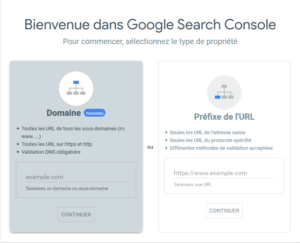
Google Search Console SEO

Domaine

Cette option permet de suivre toutes les variations d’un nom de domaine (sous-domaines, HTTP et HTTPS). La validation se fait via l’ajout d’un enregistrement TXT dans la configuration DNS de votre domaine.

Préfixe de l’URL

Cette méthode permet de suivre une URL spécifique. Elle est utile pour compartimenter les analyses, mais nécessite de créer une propriété distincte pour chaque version du site (HTTP, HTTPS, sous-domaines).

3. Validation de la propriété

Plusieurs méthodes permettent de valider la propriété de votre site :

  • Importation d’un fichier HTML

  • Ajout d’une balise Meta HTML sur la page d’accueil

  • Par le compte Google Analytics du site

  • Via Google Tag Manager

  • Validation via le fournisseur de domaine

Une fois la validation effectuée, vous pourrez gérer toutes les informations et les utilisateurs depuis l’onglet Paramètres.

Gestion des utilisateurs dans la Google Search Console

Dans la section « Utilisateurs et autorisations », le propriétaire peut :

  • Ajouter de nouveaux utilisateurs avec accès total ou accès limité

  • Supprimer des utilisateurs existants en quelques clics

  • Contrôler les permissions et les actions possibles pour chaque utilisateur

Cette fonctionnalité est essentielle pour collaborer avec votre équipe SEO ou des agences externes tout en sécurisant l’accès à vos données.

Bientôt disponibles : Suivi avancé des performances SEO

Prochainement, nous détaillerons les fonctionnalités avancées de la Google Search Console, notamment :

  • Suivi des performances SEO de votre site

  • Inspection de l’URL

  • Gestion et optimisation de l’indexation des pages

  • Déclaration et gestion des sitemaps XML

  • Analyse des erreurs, avertissements, pages valides et exclues

FAQ : problèmes courants avec la Google Search Console

Comment supprimer un utilisateur ou la propriété d’un site ?
Depuis votre espace Search Console, sélectionnez la propriété concernée, allez dans Paramètres > Utilisateurs et autorisations, cliquez sur les trois points à côté de l’utilisateur et sélectionnez Supprimer l’accès.

Comment retirer une balise de vérification visible sur mon site ?
Supprimez simplement la balise HTML de votre page d’accueil. Vérifiez ensuite que vous conservez toujours l’accès à la Search Console. Si nécessaire, vous pouvez réimporter la balise ou utiliser une autre méthode de validation (fichier HTML, Google Analytics ou Tag Manager).

Conclusion

La Google Search Console est un outil essentiel pour tout webmaster ou consultant SEO souhaitant suivre et optimiser la visibilité de son site sur Google. Grâce à elle, il est possible de corriger les erreurs, analyser les performances et améliorer durablement le référencement naturel.

Restez connectés pour découvrir la suite de notre guide complet sur la Google Search Console et comment exploiter pleinement ses fonctionnalités pour booster votre SEO.


We use cookies to personalise content and ads, to provide social media features and to analyse our traffic. We also share information about your use of our site with our social media, advertising and analytics partners.
Cookies settings
Accept
Privacy & Cookie policy
Privacy & Cookies policy
Cookie name Active

Privacy Policy

What information do we collect?

We collect information from you when you register on our site or place an order. When ordering or registering on our site, as appropriate, you may be asked to enter your: name, e-mail address or mailing address.

What do we use your information for?

Any of the information we collect from you may be used in one of the following ways: To personalize your experience (your information helps us to better respond to your individual needs) To improve our website (we continually strive to improve our website offerings based on the information and feedback we receive from you) To improve customer service (your information helps us to more effectively respond to your customer service requests and support needs) To process transactions Your information, whether public or private, will not be sold, exchanged, transferred, or given to any other company for any reason whatsoever, without your consent, other than for the express purpose of delivering the purchased product or service requested. To administer a contest, promotion, survey or other site feature To send periodic emails The email address you provide for order processing, will only be used to send you information and updates pertaining to your order.

How do we protect your information?

We implement a variety of security measures to maintain the safety of your personal information when you place an order or enter, submit, or access your personal information. We offer the use of a secure server. All supplied sensitive/credit information is transmitted via Secure Socket Layer (SSL) technology and then encrypted into our Payment gateway providers database only to be accessible by those authorized with special access rights to such systems, and are required to?keep the information confidential. After a transaction, your private information (credit cards, social security numbers, financials, etc.) will not be kept on file for more than 60 days.

Do we use cookies?

Yes (Cookies are small files that a site or its service provider transfers to your computers hard drive through your Web browser (if you allow) that enables the sites or service providers systems to recognize your browser and capture and remember certain information We use cookies to help us remember and process the items in your shopping cart, understand and save your preferences for future visits, keep track of advertisements and compile aggregate data about site traffic and site interaction so that we can offer better site experiences and tools in the future. We may contract with third-party service providers to assist us in better understanding our site visitors. These service providers are not permitted to use the information collected on our behalf except to help us conduct and improve our business. If you prefer, you can choose to have your computer warn you each time a cookie is being sent, or you can choose to turn off all cookies via your browser settings. Like most websites, if you turn your cookies off, some of our services may not function properly. However, you can still place orders by contacting customer service. Google Analytics We use Google Analytics on our sites for anonymous reporting of site usage and for advertising on the site. If you would like to opt-out of Google Analytics monitoring your behaviour on our sites please use this link (https://tools.google.com/dlpage/gaoptout/)

Do we disclose any information to outside parties?

We do not sell, trade, or otherwise transfer to outside parties your personally identifiable information. This does not include trusted third parties who assist us in operating our website, conducting our business, or servicing you, so long as those parties agree to keep this information confidential. We may also release your information when we believe release is appropriate to comply with the law, enforce our site policies, or protect ours or others rights, property, or safety. However, non-personally identifiable visitor information may be provided to other parties for marketing, advertising, or other uses.

Registration

The minimum information we need to register you is your name, email address and a password. We will ask you more questions for different services, including sales promotions. Unless we say otherwise, you have to answer all the registration questions. We may also ask some other, voluntary questions during registration for certain services (for example, professional networks) so we can gain a clearer understanding of who you are. This also allows us to personalise services for you. To assist us in our marketing, in addition to the data that you provide to us if you register, we may also obtain data from trusted third parties to help us understand what you might be interested in. This ‘profiling’ information is produced from a variety of sources, including publicly available data (such as the electoral roll) or from sources such as surveys and polls where you have given your permission for your data to be shared. You can choose not to have such data shared with the Guardian from these sources by logging into your account and changing the settings in the privacy section. After you have registered, and with your permission, we may send you emails we think may interest you. Newsletters may be personalised based on what you have been reading on theguardian.com. At any time you can decide not to receive these emails and will be able to ‘unsubscribe’. Logging in using social networking credentials If you log-in to our sites using a Facebook log-in, you are granting permission to Facebook to share your user details with us. This will include your name, email address, date of birth and location which will then be used to form a Guardian identity. You can also use your picture from Facebook as part of your profile. This will also allow us and Facebook to share your, networks, user ID and any other information you choose to share according to your Facebook account settings. If you remove the Guardian app from your Facebook settings, we will no longer have access to this information. If you log-in to our sites using a Google log-in, you grant permission to Google to share your user details with us. This will include your name, email address, date of birth, sex and location which we will then use to form a Guardian identity. You may use your picture from Google as part of your profile. This also allows us to share your networks, user ID and any other information you choose to share according to your Google account settings. If you remove the Guardian from your Google settings, we will no longer have access to this information. If you log-in to our sites using a twitter log-in, we receive your avatar (the small picture that appears next to your tweets) and twitter username.

Children’s Online Privacy Protection Act Compliance

We are in compliance with the requirements of COPPA (Childrens Online Privacy Protection Act), we do not collect any information from anyone under 13 years of age. Our website, products and services are all directed to people who are at least 13 years old or older.

Updating your personal information

We offer a ‘My details’ page (also known as Dashboard), where you can update your personal information at any time, and change your marketing preferences. You can get to this page from most pages on the site – simply click on the ‘My details’ link at the top of the screen when you are signed in.

Online Privacy Policy Only

This online privacy policy applies only to information collected through our website and not to information collected offline.

Your Consent

By using our site, you consent to our privacy policy.

Changes to our Privacy Policy

If we decide to change our privacy policy, we will post those changes on this page.
Save settings
Cookies settings
Défiler vers le haut